AI Workloads Authentication has become a critical part of modern cloud security as organizations increasingly run AI applications across multiple platforms. Many businesses use Amazon Web Services (AWS) for infrastructure while relying on Google Cloud for machine learning, AI models, data analytics, and storage. As multi-cloud environments continue to grow, secure AI workloads authentication between AWS and Google Cloud is essential for protecting sensitive data and ensuring reliable access to cloud resources.
However, securely connecting AI workloads running on AWS to services hosted on Google Cloud presents a significant challenge. Traditionally, organizations used service account keys to authenticate applications between cloud environments. While functional, these keys introduce security risks such as accidental exposure, unauthorized access, and complex key management requirements.
To address these challenges, cloud providers now support more secure authentication methods that eliminate the need for long-lived service account keys. Modern identity federation and workload authentication systems allow AI applications to securely access Google Cloud resources without storing sensitive credentials.
This guide explains how AI workloads authenticate between AWS and Google Cloud without service account keys, why organizations are adopting this approach, and the benefits it provides for security and operational efficiency.
Understanding Multi-Cloud AI Workloads
Many organizations no longer rely on a single cloud provider.
A business may:
- Train machine learning models on Google Cloud.
- Store data in AWS.
- Run AI inference services across multiple regions.
- Use cloud-native services from both providers.
For example, an AI-powered customer support platform might process customer interactions on AWS while accessing AI models hosted on Google Cloud.
In these situations, secure communication between cloud environments becomes essential.
Authentication ensures that applications can access authorized resources while preventing unauthorized systems from gaining access.
The Problem With Service Account Keys
For many years, organizations used service account keys to authenticate applications.
A service account key is typically a downloadable credential file that grants access to cloud resources.
Although widely used, this method has several disadvantages.
Security Risks
If a key is accidentally exposed through:
- Source code repositories
- Configuration files
- Shared storage locations
- Misconfigured servers
attackers may gain unauthorized access to cloud resources.
Difficult Key Management
Organizations must regularly:
- Generate keys
- Rotate credentials
- Monitor usage
- Revoke compromised keys
Managing hundreds or thousands of credentials becomes increasingly difficult.
Long-Term Exposure
Unlike temporary credentials, service account keys often remain valid for extended periods.
This increases security risks if credentials are leaked or stolen.
As cloud security practices evolved, organizations began moving toward keyless authentication solutions.
What Is Keyless Authentication?
Keyless authentication eliminates the need to store permanent credential files.
Instead of relying on long-lived keys, applications use trusted identity systems to verify who they are and obtain temporary access credentials.
This approach provides:
- Improved security
- Reduced credential management
- Automatic credential rotation
- Better compliance practices
For AI workloads operating across AWS and Google Cloud, keyless authentication significantly reduces operational complexity.
Understanding Workload Identity Federation
One of the most important technologies enabling secure cloud authentication is Workload Identity Federation.
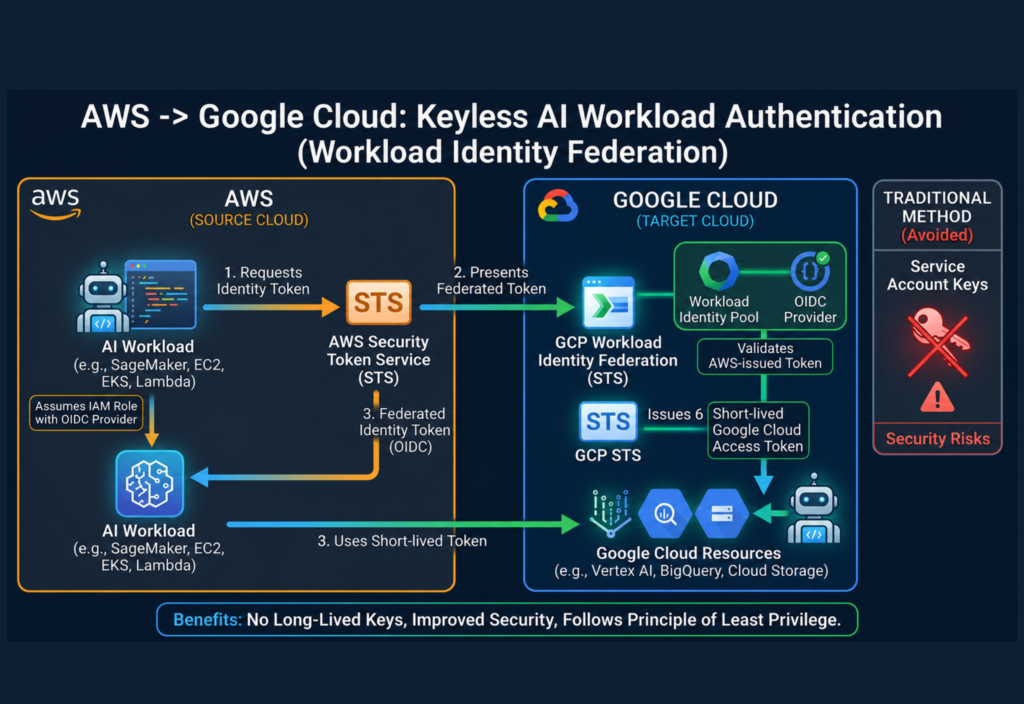
Workload Identity Federation allows external workloads to access Google Cloud resources without requiring service account keys.
Instead of storing credentials, Google Cloud trusts identity information provided by another platform, such as AWS.
The process enables AI workloads running on AWS to securely request temporary Google Cloud credentials when needed.
This creates a more secure and scalable authentication model.
How Authentication Works Between AWS and Google Cloud
The authentication process follows several steps.
Step 1: AI Workload Runs on AWS
An application, machine learning service, or AI workload operates within an AWS environment.
The workload may be running on:
- Amazon EC2
- Amazon ECS
- AWS Lambda
- Amazon EKS
The application requires access to a Google Cloud resource.
Step 2: AWS Provides Identity Information
AWS verifies the workload’s identity using its built-in identity and security systems.
The workload receives proof of its AWS identity.
This proof acts as evidence that the application is running within an authorized AWS environment.
Step 3: Google Cloud Validates the Identity
Google Cloud receives the identity information and verifies its authenticity.
The cloud platform checks whether the AWS workload matches predefined trust policies.
If the workload meets all requirements, access is approved.
Step 4: Temporary Credentials Are Issued
Instead of providing a permanent service account key, Google Cloud generates temporary credentials.
These credentials:
- Have limited lifetimes
- Are automatically rotated
- Reduce exposure risks
- Follow least-privilege principles
The AI workload can now access authorized Google Cloud services securely.
Why AI Workloads Need Secure Authentication
Artificial intelligence systems often process valuable and sensitive information.
Examples include:
- Customer interactions
- Business analytics
- Financial insights
- Healthcare data
- Machine learning models
Protecting these resources is critical.
Secure authentication helps organizations:
Prevent Unauthorized Access
Only approved workloads can access cloud resources.
Protect AI Models
Organizations can secure valuable machine learning assets from unauthorized use.
Meet Compliance Requirements
Modern security frameworks increasingly discourage long-lived credentials.
Reduce Operational Risk
Temporary credentials reduce the chances of credential theft.
Benefits of Keyless Authentication for AI Workloads
Organizations are rapidly adopting keyless authentication because of its advantages.
Stronger Security
Temporary credentials are significantly safer than permanent keys.
Even if a credential is intercepted, it quickly expires.
Reduced Credential Management
Security teams no longer need to manage large numbers of service account keys.
Improved Scalability
Large AI deployments can authenticate automatically without manual credential distribution.
Better Compliance
Many security frameworks recommend minimizing the use of long-lived credentials.
Lower Risk of Data Exposure
Removing credential files reduces the chances of accidental leaks.
Common Use Cases
Machine Learning Pipelines
Organizations often train and process machine learning models across multiple cloud environments.
Keyless authentication enables secure communication between services.
AI-Powered Applications
Applications using Google Cloud AI services can securely authenticate from AWS-hosted environments.
Data Analytics Platforms
Businesses can connect analytics systems across cloud providers without exposing credentials.
Enterprise AI Solutions
Large organizations benefit from centralized security policies and reduced credential management overhead.
Best Practices for Secure AI Authentication
Organizations should follow several security best practices.
Apply Least-Privilege Access
Grant only the permissions required for each workload.
Monitor Authentication Activity
Review logs regularly to identify unusual access patterns.
Use Temporary Credentials
Avoid storing permanent credentials whenever possible.
Separate Production and Testing Environments
Different environments should have separate authentication configurations.
Regularly Review Access Policies
Security requirements evolve over time and should be updated accordingly.
Challenges Organizations May Face
While keyless authentication offers many benefits, implementation can require planning.
Common challenges include:
Initial Configuration Complexity
Setting up trust relationships between cloud providers may require technical expertise.
Permission Management
Access policies must be carefully designed to avoid excessive privileges.
Multi-Cloud Governance
Organizations need consistent security practices across environments.
Despite these challenges, the long-term benefits often outweigh the initial setup effort.
The Future of Cloud Authentication
The cloud industry is moving toward identity-based security models.
As AI adoption grows, organizations are expected to rely increasingly on:
- Identity federation
- Temporary credentials
- Zero-trust architectures
- Automated security controls
Traditional credential-based authentication is gradually being replaced by more secure alternatives.
Keyless authentication represents a major step toward stronger cloud security and better operational efficiency.
Conclusion
AI workloads operating across AWS and Google Cloud require secure, scalable authentication methods. While service account keys were once the standard approach, modern security practices increasingly favor keyless authentication through identity federation and temporary credentials.
By eliminating long-lived keys, organizations can improve security, simplify credential management, reduce operational risks, and better protect valuable AI resources. As multi-cloud AI environments continue to expand, secure workload authentication will remain a critical component of modern cloud infrastructure.
Businesses adopting keyless authentication today are better positioned to build secure, scalable, and future-ready AI systems across cloud platforms.