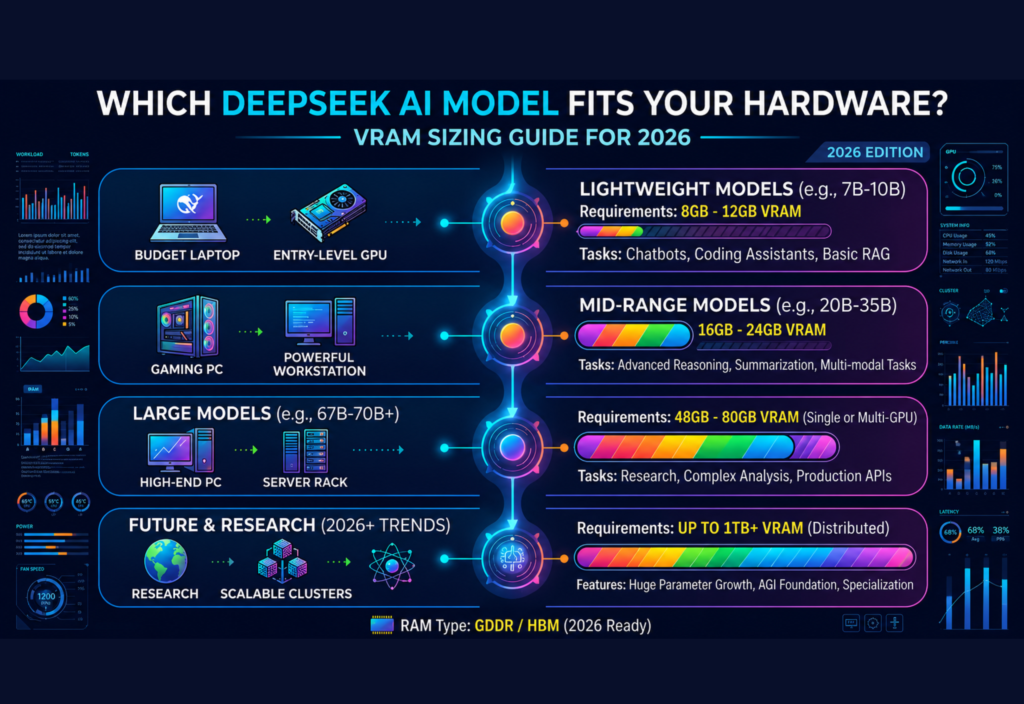
The rapid growth of artificial intelligence has made powerful AI models more accessible than ever before. Among the most popular open-weight AI models available today, DeepSeek AI has gained significant attention for its strong reasoning capabilities, coding assistance, content generation, and advanced language understanding.
However, before running a DeepSeek AI model locally, one important question must be answered:
Which DeepSeek AI model fits your hardware?
The answer depends largely on your available VRAM (Video Random Access Memory), system RAM, storage, and intended use case. Choosing a model that exceeds your hardware capabilities can result in slow performance, crashes, or an inability to load the model altogether.
This guide explains DeepSeek AI model sizes, VRAM requirements, hardware recommendations, and how to select the right model for your PC in 2026.
What Is DeepSeek AI?
DeepSeek AI is a family of large language models designed to perform tasks such as:
- Content writing
- Coding assistance
- Research support
- Data analysis
- Problem solving
- Conversational AI
- Knowledge retrieval
Many users run DeepSeek models locally because they offer greater privacy, customization, and control compared to cloud-based AI services.
Local deployment allows users to interact with AI without sending data to external servers.
Why VRAM Matters
VRAM is one of the most important factors when running AI models.
VRAM is memory located directly on your graphics card (GPU). AI models use VRAM to load model weights and process user requests.
When VRAM is insufficient, users may experience:
- Slow responses
- Failed model loading
- Excessive RAM usage
- Frequent system crashes
- Reduced performance
The larger the AI model, the more VRAM is typically required.
Choosing the correct model size ensures a smoother experience.
Understanding DeepSeek Model Sizes
DeepSeek AI models are available in multiple sizes.
Smaller models require less hardware but may have lower reasoning capability.
Larger models provide stronger performance but demand significantly more resources.
Generally, model sizes range from:
- Small models
- Medium models
- Large models
- Enterprise-scale models
Each category targets different users and hardware configurations.
Entry-Level Hardware Options
Many users begin with consumer-grade gaming GPUs.
Examples include:
- NVIDIA RTX 3060
- NVIDIA RTX 4060
- NVIDIA RTX 4060 Ti
- AMD RX 7600 XT
These systems are suitable for smaller DeepSeek AI models.
Recommended VRAM
- 8 GB VRAM
- 12 GB VRAM
Ideal For
- AI chat
- Basic coding assistance
- Writing tasks
- Educational use
- Personal projects
Smaller quantized models generally perform well on this level of hardware.
Mid-Range Hardware Options
Users seeking stronger performance often choose mid-range GPUs.
Examples include:
- NVIDIA RTX 4070
- RTX 4070 Super
- RTX 5070
- RTX 5070 Ti
Recommended VRAM
- 12 GB VRAM
- 16 GB VRAM
Ideal For
- Advanced coding
- Content generation
- AI research
- Larger context windows
- Productivity workflows
This hardware tier offers a balance between affordability and performance.
High-End Hardware Options
Professional users often invest in more powerful GPUs.
Examples include:
- NVIDIA RTX 4080
- RTX 5080
- RTX 4090
- RTX 5090
Recommended VRAM
- 16 GB VRAM
- 24 GB VRAM
- 32 GB VRAM
Ideal For
- Large AI models
- Professional development
- Long-context reasoning
- Local AI assistants
- Advanced research
These GPUs can run larger DeepSeek models with significantly faster response times.
Workstation and Enterprise Hardware
Organizations and AI researchers frequently use workstation-class hardware.
Examples include:
- NVIDIA RTX 6000 series
- NVIDIA A100
- NVIDIA H100
- Multi-GPU systems
Recommended VRAM
- 48 GB VRAM
- 80 GB VRAM
- 120+ GB combined VRAM
Ideal For
- Model training
- Enterprise deployments
- AI research
- Massive language models
- High-volume inference
This category is typically used by businesses and research institutions.
DeepSeek AI Model Selection by VRAM
8 GB VRAM
Best for:
- Lightweight DeepSeek models
- Casual AI use
- Students
- Beginners
Users should prioritize smaller quantized models for smooth performance.
12 GB VRAM
Best for:
- Moderate AI workloads
- Coding projects
- Content creation
- Productivity tasks
This is one of the most popular hardware categories among local AI enthusiasts.
16 GB VRAM
Best for:
- Advanced reasoning
- Longer conversations
- Professional workflows
- More capable model variants
This configuration provides excellent flexibility.
24 GB VRAM
Best for:
- Large DeepSeek models
- Heavy AI usage
- Research projects
- Enterprise applications
Many power users consider 24 GB VRAM the sweet spot for local AI deployment.
48 GB VRAM and Above
Best for:
- Large-scale AI operations
- Research environments
- Commercial deployment
- Training workloads
These systems provide maximum flexibility for future AI advancements.
The Role of Quantization
Quantization is a technique that reduces memory requirements.
Instead of loading full-precision models, users can load compressed versions.
Benefits include:
- Lower VRAM usage
- Faster loading
- Reduced hardware requirements
- Improved accessibility
Many DeepSeek AI users rely on quantized models to run advanced AI systems on consumer hardware.
System RAM Requirements
VRAM is critical, but system RAM also matters.
Recommended RAM configurations include:
Basic Usage
- 16 GB RAM
Moderate Usage
- 32 GB RAM
Professional Usage
- 64 GB RAM
Research and Enterprise
- 128 GB RAM or more
Adequate RAM prevents bottlenecks when handling large prompts and datasets.
Storage Considerations
AI models consume significant disk space.
Recommended storage:
Minimum
- 500 GB SSD
Preferred
- 1 TB SSD
Professional Use
- 2 TB SSD or larger
Fast NVMe SSDs improve model loading speeds and overall responsiveness.
Choosing the Right DeepSeek AI Model
Before selecting a model, consider the following questions.
What Is Your GPU VRAM?
This is the most important factor.
What Tasks Will You Perform?
Simple chat applications require fewer resources than advanced reasoning or coding workloads.
Do You Need Fast Responses?
Larger models may provide better results but require more computing power.
Is Future Expansion Important?
Purchasing hardware with extra VRAM can improve long-term flexibility.
Common Mistakes to Avoid
Choosing a Model That Is Too Large
Running oversized models often causes performance issues.
Ignoring Quantized Versions
Quantized models can dramatically improve usability.
Focusing Only on GPU Power
RAM and storage also affect performance.
Underestimating Future Needs
AI models continue growing, making extra VRAM a valuable investment.
Best Hardware Recommendations for 2026
Budget Users
- 8–12 GB VRAM
- 16–32 GB RAM
Enthusiasts
- 16 GB VRAM
- 32–64 GB RAM
Professionals
- 24 GB VRAM
- 64 GB RAM
Researchers and Enterprises
- 48+ GB VRAM
- 128+ GB RAM
Selecting hardware based on your workload helps maximize performance and value.
Future of Local AI Hardware
AI models are becoming more efficient, but they are also growing in complexity.
Future developments may include:
- Better quantization techniques
- Faster GPUs
- Improved memory management
- More efficient inference engines
As a result, users will gain access to increasingly powerful AI capabilities on consumer hardware.
Conclusion
Choosing the right DeepSeek AI model starts with understanding your hardware limitations and VRAM capacity. While smaller models can run effectively on entry-level GPUs, larger and more advanced DeepSeek AI models require significantly more memory and computing power.
By matching your VRAM, RAM, and storage to the appropriate model size, you can achieve better performance, smoother inference, and a more enjoyable AI experience. Whether you are a beginner exploring local AI or a professional deploying advanced workloads, selecting the right DeepSeek AI model for your hardware is the key to maximizing efficiency in 2026.