Modern artificial intelligence is rapidly changing the way software systems are built and used. Today, AI is no longer limited to simple chatbots that only respond to questions. Instead, advanced systems are evolving into intelligent agents that can think, plan, use tools, automate workflows, and interact with real-world systems such as APIs, databases, and files.
These advanced systems are often called production-ready AI agents, meaning they are designed not just for testing or demos, but for real-world environments where reliability, security, and scalability matter.
Unlike experimental prototypes, production systems must perform consistently under real conditions and handle complex tasks without failure.
A strong production AI system must be:
- Reliable in real environments
- Secure with proper access control
- Fast and efficient in execution
- Scalable for large workloads
- Easy to maintain and update
- Capable of integrating with real tools and systems
To achieve this level of capability, developers use modern technologies like MCP (Model Context Protocol), CLI automation tools, and AI Skills systems. These components help bridge the gap between intelligence and real-world execution.
In this article, you will learn how these systems work together, how they are structured, and how developers build real production-level AI solutions.
What Are Production-Ready AI Agents?
Production-ready AI agents are intelligent software systems designed to perform real-world tasks autonomously or semi-autonomously. They go beyond simple question-answering and can execute multi-step workflows using reasoning and external tools.
Unlike basic chatbots, these systems are capable of:
- Understanding complex user goals
- Breaking tasks into steps
- Using external APIs and services
- Automating workflows
- Storing and using memory
- Making decisions during execution
Example in Real Life
A basic chatbot may only suggest websites for booking flights.
A production-level AI system can:
- Search available flights
- Compare prices across platforms
- Select the best option based on rules
- Complete booking
- Send confirmation emails
- Update calendars automatically
This ability to take actions is what separates simple AI tools from production systems.
MCP (Model Context Protocol) in AI Systems
MCP, or Model Context Protocol, is a standardized communication layer that connects AI models with external tools, applications, and services.
It allows AI systems to safely interact with external environments in a structured and controlled way.
Why MCP Is Important
Before MCP, developers had to build custom integrations for every tool or API. This made systems complex, hard to scale, and difficult to maintain.
MCP solves this by introducing a unified way for AI systems to communicate with tools.
Key Advantages of MCP
- Standardized tool integration
- Better security control
- Easier system expansion
- Cleaner architecture design
- Reduced development complexity
How MCP Helps in Real Systems
With MCP, an AI system can:
- Access databases securely
- Call APIs in a structured way
- Retrieve documents
- Interact with applications
- Perform controlled actions
This makes AI systems more reliable and production-friendly.
CLI Tools in AI Automation Systems
CLI (Command Line Interface) tools give AI systems the ability to execute system-level commands directly on servers or environments.
This adds powerful automation capabilities to AI systems.
Common CLI Use Cases
- Managing files and directories
- Running scripts and programs
- Handling Git operations
- Deploying applications
- Managing Docker containers
- Monitoring system processes
Example CLI Commands
python analyze_data.py
git add .
git commit -m "update system"
docker ps
Benefits of CLI Integration
- Fast execution of tasks
- Direct control over systems
- Useful for backend automation
- Highly flexible for developers
Important Note
In production environments, CLI access must always be restricted and controlled. Without proper safeguards, it can lead to serious security risks.
AI Skills System Explained
AI Skills are modular, reusable capabilities that allow AI systems to perform specific tasks efficiently.
Think of skills as specialized “functions” inside an AI agent.
Examples of AI Skills
- Content writing skill
- Data analysis skill
- Coding assistance skill
- Research and summarization skill
- Customer support skill
- SEO optimization skill
Why Skills Are Useful
Instead of building logic from scratch every time, skills allow developers to reuse functionality across different workflows.
This makes systems:
- More organized
- Easier to scale
- Easier to debug
- More maintainable
Skills also help separate responsibilities inside AI systems, improving structure and efficiency.
Architecture of Modern AI Systems
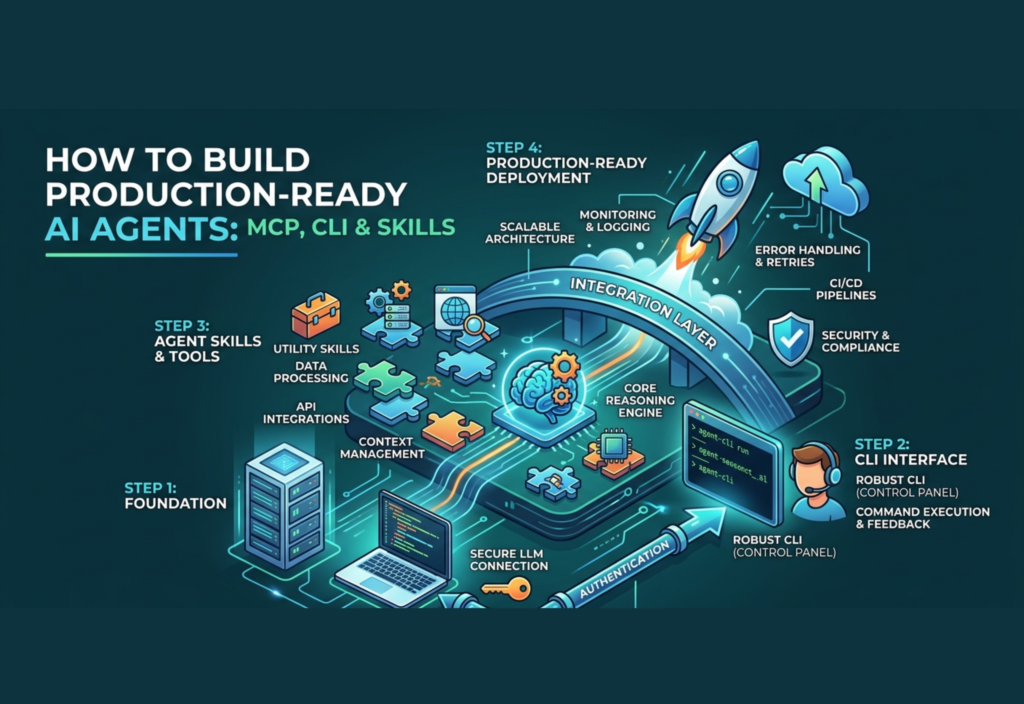
A well-designed AI system follows a layered architecture that separates intelligence, reasoning, tools, and execution.
Typical Architecture Flow
User Request
 ↓
AI Core Model
 ↓
Planning & Reasoning Layer
 ↓
Skills System
 ↓
MCP Integration Layer
 ↓
Tools / APIs / CLI / Databases
Explanation of Each Layer
- AI Core → Understands user input
- Planner → Breaks tasks into steps
- Skills Layer → Executes specific tasks
- MCP Layer → Connects external tools securely
- Execution Layer → Performs real-world actions
This structure ensures scalability, flexibility, and stability in production systems.
How to Build Production-Level AI Systems
Building real-world AI systems requires a structured approach rather than random experimentation.
Step 1: Define the Use Case
Decide what the AI system will do:
- Customer support
- Research assistant
- Coding assistant
- Automation system
Step 2: Choose an AI Model
Select a model based on:
- Performance
- Cost
- Speed
- Context handling ability
Step 3: Add Tool Integration Using MCP
Connect the AI system to:
- APIs
- Databases
- External applications
- Cloud services
Step 4: Add Memory System
Memory allows the system to remember:
- User preferences
- Previous conversations
- Task history
Step 5: Create Skills
Develop reusable modules for tasks like writing, analysis, coding, or research.
Step 6: Integrate CLI (Safely)
CLI should only be used in controlled and sandboxed environments to avoid security risks.
Step 7: Add Monitoring and Logging
Track system behavior, including:
- Errors
- Performance
- API usage
- Task execution logs
Security in AI Systems
Security is one of the most important aspects of production AI systems.
Best Practices
- Use sandboxed environments
- Limit system permissions
- Encrypt sensitive data
- Log all actions
- Require approval for critical tasks
Without proper security, AI systems cannot be safely deployed in real environments.
Real-World Applications
AI Coding Systems
- Generate code
- Debug errors
- Run tests
- Deploy applications
AI Research Systems
- Collect information
- Analyze documents
- Summarize reports
AI Marketing Systems
- Generate content
- Optimize SEO
- Manage campaigns
AI Customer Support Systems
- Answer user queries
- Handle tickets
- Update CRM data
Future of AI Systems
AI systems are moving toward full autonomy. In the future, they will be able to manage entire workflows and business processes with minimal human intervention.
Future systems may:
- Run entire companies
- Automate software development
- Manage complex workflows
- Coordinate multiple AI agents
Technologies like MCP, CLI automation, and Skills systems are the foundation of this future.
Final Thoughts
AI is evolving from simple chatbots into powerful intelligent systems capable of real-world execution. Building production-ready AI systems requires careful architecture, secure tool integration, and modular design.
By combining MCP for connectivity, CLI for automation, and Skills for structured intelligence, developers can build scalable, secure, and highly capable AI systems that are ready for real production environments.