
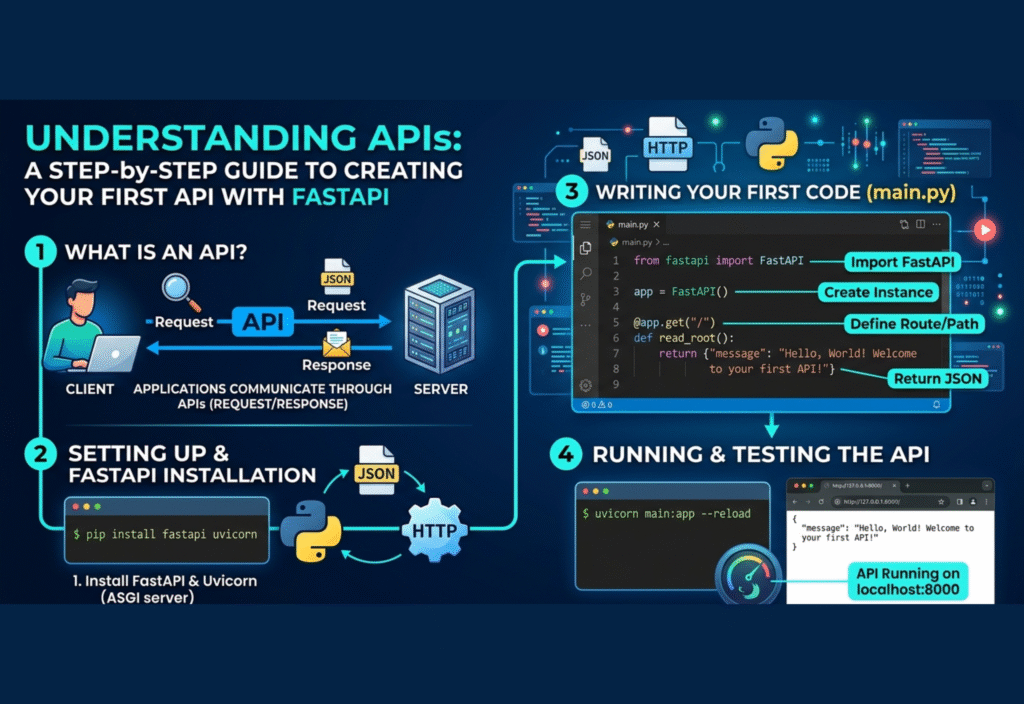
FastAPI API guide: build your first API with FastAPI is a powerful way to learn how modern APIs work. In this guide, you will learn how to create your first API step by step using FastAPI
In this guide, you will learn the fundamentals of APIs and how to build your first API using FastAPI, a modern Python framework designed for high performance and ease of use.
What is an API
An API is a set of rules and protocols that allow one software application to interact with another. It defines how requests and responses are structured so that systems can communicate without needing to understand each other’s internal workings.
Simple Example
Imagine you are using a mobile app to check the weather. The app sends a request to a server through an API, and the server responds with weather data. The API acts as a bridge between the app and the server.
What is FastAPI
FastAPI is a modern web framework for building APIs using Python. It is known for its speed, simplicity, and developer-friendly features.
FastAPI is widely used because it provides automatic validation, built-in documentation, and high performance. It is based on standard Python type hints, which makes the code easier to read and maintain.
Setting Up the Environment
Before creating your API, you need to install FastAPI and an ASGI server called Uvicorn.
Installation Command
pip install fastapi uvicorn
FastAPI handles the API logic, while Uvicorn runs the server and serves your application.
Creating Your First API
Step 1: Create a Python File
Create a file named main.py.
Step 2: Write the Basic Code
from fastapi import FastAPI
app = FastAPI()
@app.get(“/”)
def read_root():
return {“message”: “Welcome to your first API”}
Explanation
-
FastAPI() creates the application instance
-
@app.get(“/”) defines a route for handling GET requests
-
The function returns a JSON response
Running the API
To run your API, use the following command:
uvicorn main:app –reload
Explanation
-
mainrefers to the file name -
appis the FastAPI instance -
--reloadautomatically updates the server when changes are made
Testing Your API
Open your browser and go to:
http://127.0.0.1:8000
You should see a JSON response like:
{“message”: “Welcome to your first API”}
FastAPI also provides automatic documentation, which you can access at:
http://127.0.0.1:8000/docs
Adding Path Parameters
You can create dynamic routes using path parameters.
@app.get(“/items/{item_id}”)
def get_item(item_id: int):
return {“item_id”: item_id}
This allows users to access different data by changing the URL.
Using Query Parameters
Query parameters allow you to pass optional data in the URL.
@app.get(“/users/”)
def get_user(name: str = None):
return {“name”: name}
Example usage:
http://127.0.0.1:8000/users/?name=Ali
Handling POST Requests
To create data, you can use POST requests along with request bodies.
from pydantic import BaseModel
class Item(BaseModel):
name: str
price: float
@app.post(“/items/”)
def create_item(item: Item):
return item
Explanation
-
Pydantic validates the input data
-
Ensures that the data structure is correct
-
Helps maintain data integrity
API Documentation
One of the key advantages of FastAPI is automatic documentation.
FastAPI provides:
-
Swagger UI
-
ReDoc
These tools allow developers to test and understand APIs easily without additional setup.
Best Practices for API Development
Keep APIs Simple
Avoid overly complex routes and logic. Simplicity improves maintainability.
Use Clear Naming
Endpoints should be named in a way that clearly describes their purpose.
Validate Input Data
Always validate incoming data to avoid unexpected errors or security issues.
Follow REST Principles
Use standard HTTP methods:
-
GET for retrieving data
-
POST for creating data
-
PUT/PATCH for updating data
-
DELETE for removing data
Common Use Cases of APIs
APIs are used in many industries and applications:
-
Web development
-
Mobile applications
-
Cloud services
-
Data analysis systems
-
E-commerce platforms
They act as a bridge between different systems and enable seamless data exchange.
Advantages of FastAPI
FastAPI has become popular due to several advantages:
-
High performance and speed
-
Easy to learn and implement
-
Built-in validation using Python types
-
Automatic documentation generation
-
Support for asynchronous programming
Challenges in API Development
While APIs are powerful, developers may face some challenges:
-
Ensuring security and authentication
-
Managing large-scale systems
-
Handling errors properly
-
Maintaining performance under heavy load
Proper planning and best practices can help overcome these challenges.
Conclusion
APIs are an essential component of modern software development, and learning how to build them is a valuable skill. FastAPI simplifies the process by providing a fast, efficient, and easy-to-use framework for creating APIs.
By following this step-by-step guide, you have learned how to set up FastAPI, create routes, handle requests, and understand how APIs work. This foundation will help you move forward into more advanced topics such as authentication, database integration, and deployment.
With consistent practice, you can build powerful and scalable APIs that can support real-world applications.

