
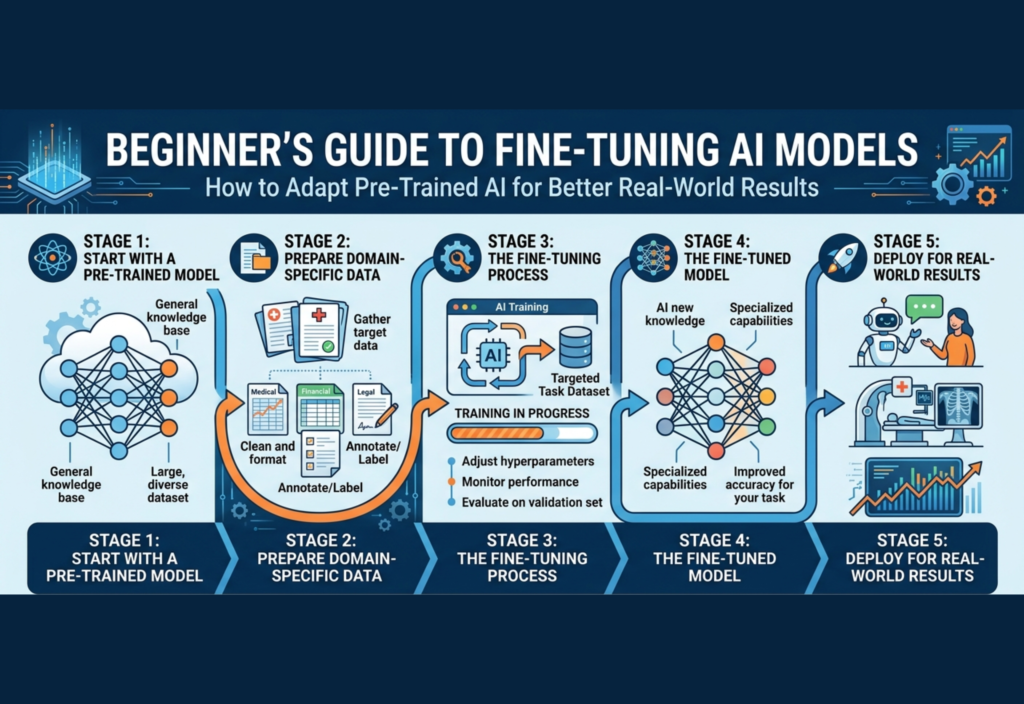
Fine-Tuning AI Models has become an essential technique in modern Artificial Intelligence (AI). Today, developers, freelancers, startups, and even beginners can use powerful pre-trained AI models to build smart applications. However, without fine-tuning AI models, these systems often produce generic results that don’t perform well in real-world, specific use cases.
This is where fine-tuning AI models becomes important. It allows you to take an already trained AI model and adapt it to your specific needs, making it smarter, more accurate, and more useful in real-world scenarios. In this comprehensive guide, you’ll learn everything you need to know—from basics to practical steps—so you can start fine-tuning AI models with confidence.
What Is Fine-Tuning?
Fine-tuning is the process of further training a pre-trained model on a smaller, task-specific dataset to improve its performance for a particular application.
Instead of starting from zero, you:
- Take a pre-trained model
- Feed it your custom data
- Adjust its parameters slightly
This helps the model specialize in your domain.
Simple Analogy
Think of a pre-trained model as a medical student who has learned general medicine. Fine-tuning is like giving that student specialized training in cardiology. The base knowledge stays, but the expertise becomes focused.
Why Fine-Tuning Is Important
While pre-trained models are impressive, they often:
- Lack domain-specific knowledge
- Produce inconsistent outputs
- Fail in niche scenarios
Fine-tuning solves these issues.
Key Advantages
1. Higher Accuracy in Specific Tasks
A fine-tuned model performs significantly better on targeted tasks.
2. Better Context Understanding
It understands industry-specific language and intent.
3. Consistent Output Style
Useful for branding, tone, and formatting.
4. Reduced Manual Prompting
Less need to write complex prompts repeatedly.
5. Competitive Advantage
Businesses can build unique AI solutions tailored to their needs.
Fine-Tuning vs Training From Scratch
| Feature | Fine-Tuning | Training from Scratch |
|---|---|---|
| Data Required | Low | Extremely High |
| Cost | Affordable | Very Expensive |
| Time | Fast | Very Slow |
| Complexity | Moderate | Very High |
For beginners, fine-tuning is the smarter and more practical approach.
Types of Fine-Tuning Techniques
1. Full Fine-Tuning
You update all the model’s parameters.
- Best performance
- Requires strong hardware (GPUs)
- Suitable for advanced users
2. Parameter-Efficient Fine-Tuning (PEFT)
Instead of updating the whole model, you only train a small subset of parameters.
Popular methods include:
- LoRA (Low-Rank Adaptation)
- Adapters
- Prefix tuning
Benefits:
- Lower cost
- Faster training
- Beginner-friendly
3. Instruction Fine-Tuning
This method trains models to follow instructions more effectively.
Example:
- Input: “Summarize this article”
- Output: A clean summary
Perfect for:
- Chatbots
- Virtual assistants
- Content tools
Step-by-Step Guide to Fine-Tuning
Step 1: Define Your Objective Clearly
Start by answering:
- What problem are you solving?
- Who will use the model?
- What output do you expect?
Examples:
- AI chatbot for customer support
- SEO content generator
- Product description writer
Clarity at this stage determines your success.
Step 2: Collect High-Quality Data
Data is the backbone of fine-tuning.
Good Dataset Characteristics:
- Relevant to your task
- Clean and structured
- Balanced and diverse
- Free from noise and errors
Example Format:
Input: "Write a formal email for job application"
Output: "Dear Hiring Manager..."
Pro Tip:
Even a small, high-quality dataset can outperform a large, messy one.
Step 3: Data Preprocessing
Before training, clean your data:
- Remove duplicates
- Fix grammar issues
- Standardize formatting
- Tokenize text (if required)
- Split data:
- Training set (80%)
- Validation set (20%)
Step 4: Choose the Right Model
Not all models are the same. Choose based on:
- Task type (text, image, etc.)
- Available resources
- Speed vs accuracy needs
Example Considerations:
- Small models → faster, cheaper
- Large models → more accurate
Step 5: Configure Training Parameters
Key settings include:
- Learning Rate → How fast the model learns
- Batch Size → Number of samples per step
- Epochs → Number of training cycles
Start with small values and adjust gradually.
Step 6: Train the Model
Use frameworks like:
- PyTorch
- TensorFlow
- Hugging Face Transformers
During training:
- Monitor loss (error rate)
- Avoid overfitting
- Save checkpoints
Step 7: Evaluate Performance
Never skip this step.
Evaluate using:
- Accuracy
- Precision and recall
- Real-world testing
Test with unseen data to ensure reliability.
Step 8: Deployment
After successful training:
- Integrate into your app or website
- Use APIs for access
- Optimize for speed
Step 9: Monitor and Improve
AI is not “set and forget.”
- Collect feedback
- Update with new data
- Retrain periodically
Common Challenges in Fine-Tuning
1. Overfitting
Model memorizes training data but fails in real use.
Solution: Use validation data and regularization.
2. Data Scarcity
Not enough data for training.
Solution:
- Use data augmentation
- Combine datasets
3. High Costs
Training can be expensive.
Solution:
- Use smaller models
- Apply PEFT techniques
4. Poor Evaluation
Skipping testing leads to bad deployment.
Solution: Always validate thoroughly.
Fine-Tuning vs Prompt Engineering
Many beginners ask: Do I really need fine-tuning?
Prompt Engineering:
- Writing better prompts
- Fast and cheap
- Limited control
Fine-Tuning:
- Deep customization
- Better long-term performance
- Requires effort
Best Strategy:
Start with prompt engineering → move to fine-tuning when needed.
Real-World Applications
Fine-tuning is widely used in:
1. Customer Support
AI trained on company FAQs for accurate responses.
2. Healthcare
Understanding medical records and terminology.
3. E-Commerce
Generating product descriptions and recommendations.
4. Finance
Fraud detection and risk analysis.
5. Content Creation
Blogs, scripts, and SEO articles.
Tools for Beginners
If you’re just starting, these tools make life easier:
- Hugging Face (user-friendly models and datasets)
- Google Colab (free GPU environment)
- OpenAI APIs
- PyTorch Lightning
Best Practices for Success
- Start small and scale gradually
- Focus on data quality over quantity
- Experiment with different parameters
- Track performance metrics
- Document your process
The Future of Fine-Tuning
Fine-tuning is evolving rapidly with:
- More efficient training methods
- Smaller, powerful models
- Easier tools for non-experts
In the future, even non-technical users will be able to fine-tune models easily.
Final Thoughts
Fine-tuning is one of the most powerful ways to unlock the full potential of AI. Instead of relying on generic outputs, you can build systems that truly understand your needs.
For beginners, the journey may seem complex at first—but with the right approach, it becomes manageable and rewarding.
Start simple. Focus on quality. Keep experimenting.
That’s how you turn a general AI model into a powerful, real-world solution.

