
Artificial Intelligence is transforming how businesses manage daily operations. In 2026, companies are increasingly using AI workflow automation tools to reduce manual work, save time, and improve productivity. These tools connect different apps, automate repetitive tasks, and allow teams to focus on more strategic work.
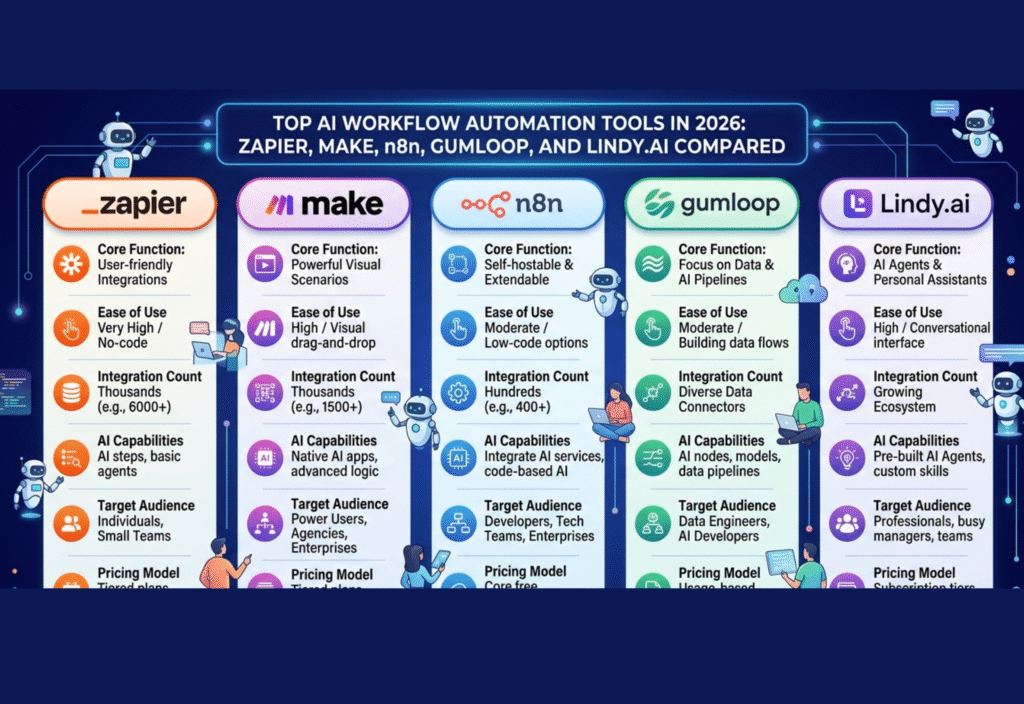
Among the many platforms available today, Zapier, Make (formerly Integromat), n8n, Gumloop, and Lindy.ai have become some of the most popular AI workflow automation tools. Each platform offers unique features designed for different users, from beginners to advanced developers. This article compares these tools to help you understand which one might be the best fit for your needs.
What Are AI Workflow Automation Tools?
AI workflow automation tools are software platforms that automate repetitive digital tasks using integrations and artificial intelligence. Instead of manually moving data between apps or performing routine actions, these tools create automated workflows that handle tasks automatically.
For example, an automation can automatically:
Save email attachments to cloud storage
Send notifications to team members
Update CRM records
Generate reports or summaries
Trigger AI-based responses
By using automation tools, businesses can streamline operations and reduce human errors.
1. Zapier – The Most Popular No-Code Automation Tool
Zapier is one of the most widely used automation platforms in the world. It allows users to create automated workflows called “Zaps” that connect thousands of apps without writing any code.
Key Features
Supports integrations with over 6,000 applications
Simple drag-and-drop workflow builder
Built-in AI tools for text generation and data processing
Multi-step automation capabilities
Best For
Small businesses, marketers, and non-technical users who want quick automation solutions.
Pros
Extremely easy to use
Huge integration library
Reliable cloud-based infrastructure
Cons
Can become expensive at scale
Limited customization compared to developer-focused tools
Zapier is ideal for users who want fast automation without dealing with technical complexity.
2. Make (Formerly Integromat) – Visual Automation for Complex Workflows
Make (formerly Integromat) is a powerful automation platform known for its visual workflow builder. It allows users to design complex automation systems with multiple branches, conditions, and data processing steps.
Key Features
Visual drag-and-drop workflow interface
Advanced data manipulation tools
Scheduling and conditional logic
Integration with many cloud apps and APIs
Best For
Businesses that need complex and detailed workflow automation.
Pros
Highly flexible automation capabilities
Visual flow diagrams make workflows easy to understand
More powerful logic compared to many competitors
Cons
Learning curve for beginners
Interface may feel complex for simple automations
Make is a great choice for teams that require advanced workflow design and control.
3. n8n – Open-Source Automation for Developers
n8n is an open-source automation platform designed for flexibility and customization. Unlike many cloud-based services, n8n can be self-hosted, giving businesses complete control over their automation environment.
Key Features
Open-source and self-hosted options
Powerful API integrations
Custom scripting capabilities
Advanced workflow logic
Best For
Developers, startups, and companies that need customizable automation infrastructure.
Pros
Highly customizable
Lower long-term costs for self-hosted setups
Strong developer community
Cons
Requires technical knowledge
Setup and maintenance can take time
For companies focused on data control and customization, n8n offers a powerful alternative to traditional automation tools.
4. Gumloop – AI-First Automation Platform
Gumloop is a newer automation platform built specifically for AI-powered workflows. Instead of simply connecting apps, Gumloop focuses on automating tasks that require intelligence, such as research, data extraction, and content generation.
Key Features
AI-powered workflow agents
Automated research and data gathering
Integration with AI models and APIs
Task automation using natural language instructions
Best For
AI startups, content teams, and businesses that rely heavily on data and research.
Pros
Designed specifically for AI workflows
Powerful automation for research tasks
Flexible AI integrations
Cons
Smaller ecosystem compared to older platforms
Still evolving as a newer tool
Gumloop is particularly useful for organizations exploring advanced AI-driven automation.
5. Lindy.ai – AI Personal Assistant for Workflows
Lindy.ai focuses on creating AI assistants that can manage tasks across different applications. Instead of building complex automation flows, users can assign tasks to AI agents that handle actions automatically.
Key Features
AI-powered task automation agents
Natural language task creation
Integration with productivity tools
Automated scheduling and communication
Best For
Professionals who want AI assistants to manage everyday digital tasks.
Pros
Simple AI-driven automation
Task-based automation model
Helpful for productivity workflows
Cons
Less granular control than traditional automation tools
Limited advanced customization
Lindy.ai represents the growing trend of AI assistants handling routine digital work.
Comparing the Top AI Workflow Automation Tools
| Tool | Best For | Key Strength |
|---|---|---|
| Zapier | Beginners & businesses | Easy automation |
| Make | Advanced workflows | Visual automation builder |
| n8n | Developers | Open-source customization |
| Gumloop | AI workflows | AI-powered automation |
| Lindy.ai | Personal productivity | AI task assistants |
Each tool serves a slightly different purpose depending on the user’s experience level and automation needs.
How to Choose the Right Automation Tool
When selecting an AI workflow automation platform, consider the following factors:
Ease of Use – Beginners may prefer simpler platforms like Zapier or Lindy.ai.
Customization – Developers often choose n8n for flexibility.
Workflow Complexity – Make works well for advanced automation flows.
AI Capabilities – Gumloop offers strong AI-focused automation features.
Budget – Pricing models vary depending on usage and hosting options.
Choosing the right tool depends on how complex your workflows are and how much control you need.
The Future of AI Workflow Automation
The future of workflow automation will likely focus on AI agents that can understand tasks, make decisions, and execute actions automatically. Instead of manually designing workflows step-by-step, users will simply describe their goals and AI systems will build automation processes on their behalf.
Platforms like Gumloop and Lindy.ai already demonstrate this shift toward intelligent automation.
As AI continues to evolve, automation tools will become more powerful, enabling businesses to operate faster and more efficiently.
Conclusion
AI workflow automation tools are becoming essential for modern businesses. Platforms like Zapier, Make, n8n, Gumloop, and Lindy.ai each offer different strengths, from beginner-friendly automation to developer-level customization and AI-powered workflows.
By understanding the capabilities of each tool, businesses can choose the platform that best fits their automation strategy and unlock greater efficiency in their daily operations.

