
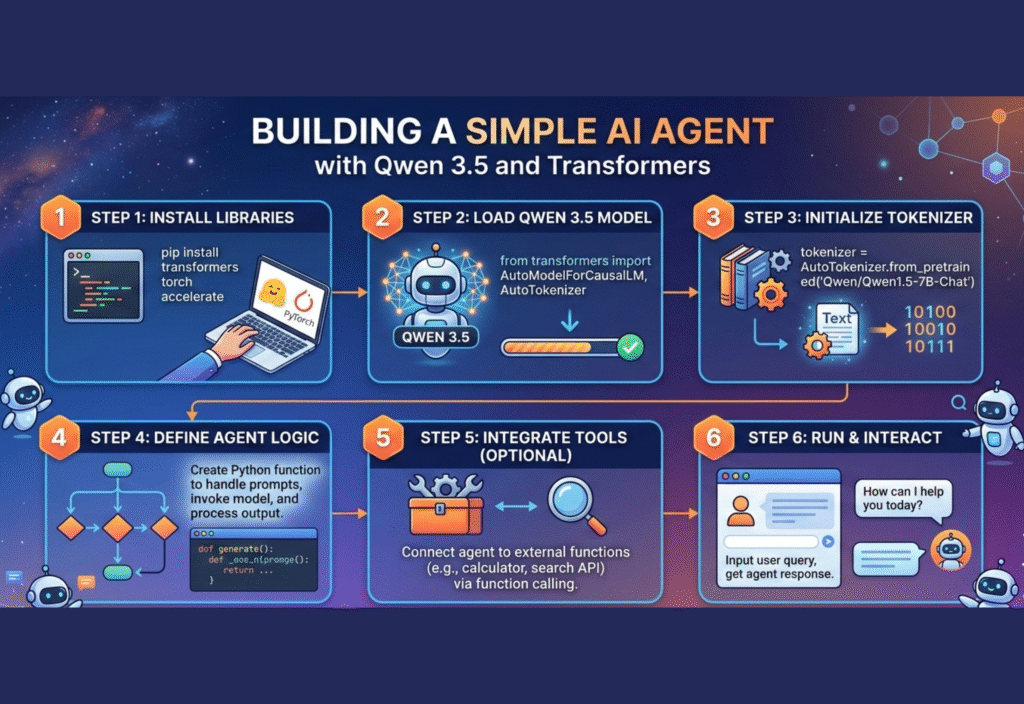
Artificial Intelligence is rapidly transforming the way developers build applications. Instead of writing rigid programs that only follow predefined instructions, modern systems can now reason, respond, and even perform tasks autonomously. One of the most exciting developments in this space is the rise of AI agents—programs that can understand instructions, make decisions, and interact with tools or data.
With open-source tools and powerful language models, building a simple AI agent is now possible even for individual developers. In this guide, we will learn how to create a minimal AI agent using Qwen 3.5 and the Hugging Face Transformers library.
This tutorial explains the concept step by step so beginners can understand how an AI agent works and how to implement one with Python.
Understanding What an AI Agent Is
An AI agent is a program that can observe information, process it with intelligence, and take actions based on goals. Unlike a simple chatbot that only replies to text, an AI agent may perform additional tasks such as searching information, analyzing data, or interacting with external tools.
A basic AI agent usually contains three key components:
-
Input Layer – Receives instructions or queries from a user.
-
Reasoning Engine – Uses a language model to interpret the request and decide what to do.
-
Action System – Executes tasks such as answering questions, calling APIs, or generating content.
When these elements are combined, the system can behave like a small autonomous assistant.
Why Use Qwen 3.5 for an AI Agent
Modern AI agents rely heavily on large language models. Among the latest open models, Qwen 3.5 has become popular because it offers strong reasoning capabilities and efficient performance.
Some advantages include:
-
High-quality natural language understanding
-
Strong coding and reasoning abilities
-
Open ecosystem integration
-
Compatibility with many AI frameworks
Because of these strengths, it works well for building lightweight AI agents.
The Role of the Transformers Library
To interact with AI models easily, developers often rely on libraries that simplify the process of loading and running models. One of the most widely used tools in the AI community is the Transformers library.
The Transformers ecosystem provides:
-
Pretrained models ready for use
-
Simple APIs for text generation
-
Support for multiple architectures
-
Easy integration with Python applications
Using Transformers allows developers to run advanced AI models with only a few lines of code.
Setting Up the Development Environment
Before building the agent, you need a working Python environment. Install the required libraries using pip.
Basic setup steps include:
-
Install Python (version 3.9 or newer).
-
Create a virtual environment.
-
Install the required packages.
Example installation commands:
pip install torch
pip install transformers
pip install accelerate
These libraries enable the model to run efficiently on your system.
Loading the Qwen Model
After installing dependencies, the next step is loading the model through the Transformers interface.
A simple Python script can initialize the model and tokenizer.
Example structure:
from transformers import AutoTokenizer, AutoModelForCausalLM
model_name = “Qwen/Qwen3.5”
tokenizer = AutoTokenizer.from_pretrained(model_name)
model = AutoModelForCausalLM.from_pretrained(model_name)
This code downloads the model and prepares it for generating responses.
Creating a Basic AI Agent Loop
The core of a minimal AI agent is a loop that receives instructions and produces responses.
The process typically follows these steps:
-
Receive a user query
-
Convert the text into tokens
-
Generate a response using the model
-
Display the output
Example concept:
while True:
user_input = input(“User: “)
inputs = tokenizer(user_input, return_tensors=”pt”)
outputs = model.generate(**inputs, max_new_tokens=100)
response = tokenizer.decode(outputs[0])
print(“Agent:”, response)
This simple structure already behaves like a basic conversational AI agent.
Adding Context and Memory
A more capable AI agent should remember previous interactions. Context memory allows the model to respond more intelligently.
You can implement a simple memory system by storing conversation history.
For example:
-
Store previous prompts in a list
-
Append new messages
-
Send the combined context to the model
This helps the agent maintain coherent conversations instead of treating every message as an isolated request.
Improving the Agent’s Reasoning
A minimal agent can be improved using prompt engineering techniques.
Some effective strategies include:
Instruction Prompts
Provide clear instructions to guide the model’s behavior.
Example:
“Act as an AI assistant that explains technical concepts clearly.”
Structured Thinking
Encourage the model to think step by step before answering.
Example:
“Analyze the problem step by step and then provide the final solution.”
Tool Awareness
You can instruct the agent to decide when to use external tools such as calculators or APIs.
Expanding the Agent with Tools
Even a minimal AI agent can become powerful when connected to external tools.
Possible integrations include:
-
Web search APIs
-
Data analysis libraries
-
File readers
-
Knowledge bases
By combining reasoning with tools, the agent can perform real tasks rather than just generating text.
Performance Considerations
Running AI models locally requires computational resources. Some tips for smoother performance include:
-
Use smaller model variants if hardware is limited
-
Enable GPU acceleration if available
-
Limit the maximum response length
-
Cache frequently used responses
These adjustments help maintain efficiency while experimenting with AI agents.
Security and Ethical Considerations
When building AI systems, developers should also consider responsible usage.
Key practices include:
-
Avoid generating misleading information
-
Respect privacy and data protection
-
Use transparent AI behavior
-
Implement safeguards for user input
Responsible design ensures AI technology benefits users while minimizing risks.
Real-World Applications of Minimal AI Agents
Even simple agents can be useful in many scenarios.
Examples include:
Customer support assistants that answer common questions.
Developer assistants that help with coding tasks.
Educational tutors that explain difficult topics.
Content helpers that assist with writing and editing.
These applications demonstrate how lightweight AI agents can still deliver significant value.
The Future of AI Agents
AI agents are evolving quickly as models become more capable and frameworks more sophisticated. Developers are moving from simple chatbots to systems that can reason, plan, and execute complex workflows.
Open-source models, efficient inference techniques, and collaborative AI frameworks are accelerating innovation in this space. As tools improve, creating intelligent assistants will become easier for developers around the world.
Conclusion
Building an AI agent is no longer limited to large research labs or tech companies. With modern language models and accessible libraries, developers can create powerful systems using only a few components.
By combining Qwen 3.5 with the Transformers framework, it is possible to build a lightweight yet capable AI agent that can understand instructions and generate meaningful responses.

