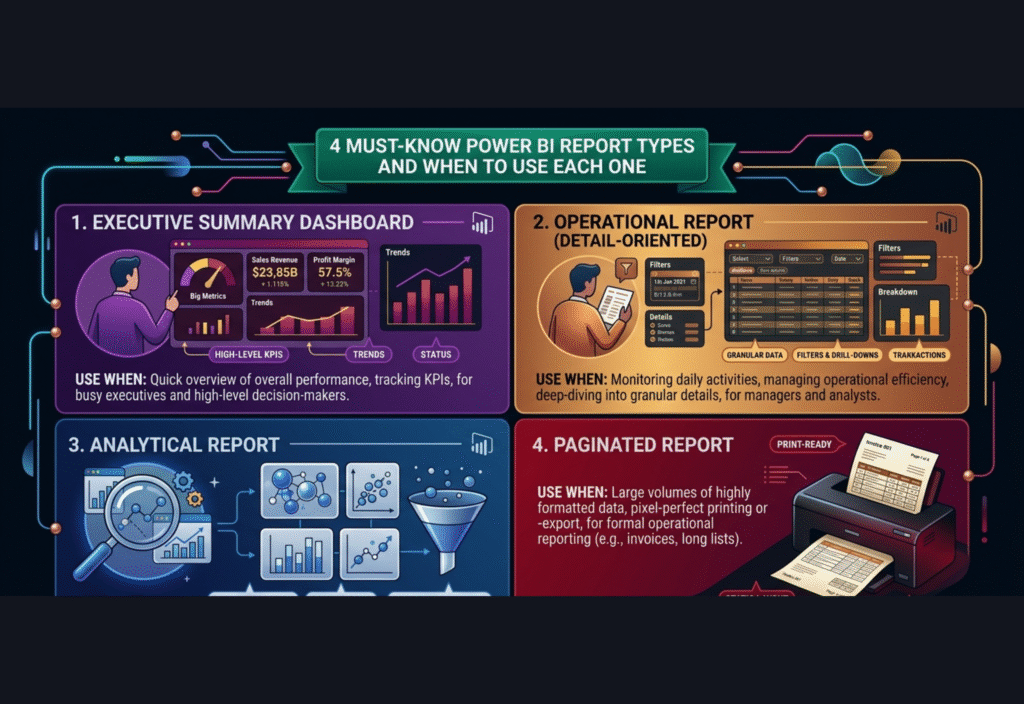
Power BI report types are essential for understanding how to present and analyze data effectively. Different report types in Power BI serve different purposes, helping users turn raw data into clear insights. Knowing the right Power BI report types and when to use each one improves decision-making and reporting quality.
However, simply creating reports is not enough. The effectiveness of Power BI depends heavily on choosing the right type of report for the right situation. Each report type serves a specific purpose, and understanding these differences helps you deliver better insights, improve communication, and support decision-making at every level of the organization.
This article explores four important Power BI report types in detail and explains when to use each one in real-world scenarios.
Understanding Power BI Reports
A report in Power BI is a collection of visual elements such as charts, graphs, tables, and maps that represent data in a structured and meaningful way. These reports allow users to analyze trends, compare performance, and track key metrics.
Power BI reports are interactive, meaning users can explore data, apply filters, and drill down into details. This flexibility makes Power BI one of the most powerful business intelligence tools available today.
However, not all reports are the same. Different situations require different reporting styles. Selecting the correct type ensures clarity, efficiency, and better understanding of data.
1. Standard Reports
Standard reports are the most basic and commonly used type of reports in Power BI. They are designed to present data in a structured and easy-to-understand format.
These reports typically include multiple visualizations such as bar charts, line graphs, pie charts, and tables arranged in a logical layout. The main purpose of standard reports is to provide a clear overview of business performance.
For example, a sales report can display monthly revenue, product performance, regional sales, and growth trends in one place. This allows users to quickly understand how the business is performing.
Standard reports are ideal for regular reporting tasks. Businesses often use them for daily, weekly, or monthly reports to monitor progress and track performance against goals.
One of the biggest advantages of standard reports is their simplicity. They are easy to create and easy to interpret, making them suitable for both technical and non-technical users.
These reports are best used when:
You need to track key performance indicators
You want consistent reporting formats
You are sharing reports with a wide audience
You require regular reporting updates
Standard reports form the foundation of most reporting systems and are often the starting point for more advanced analysis.
2. Interactive Reports
Interactive reports take reporting to a more advanced level by allowing users to interact with the data. These reports provide dynamic features such as filtering, sorting, and drilling down into specific data points.
This interactivity enables users to explore data in different ways without needing to create multiple reports. It gives users control over how they view and analyze the data.
For example, a marketing manager can use an interactive report to analyze campaign performance across different regions. By applying filters, they can view data for a specific country, compare time periods, or focus on a particular audience segment.
Interactive reports are extremely useful for deep analysis. They allow users to identify patterns, trends, and anomalies that may not be visible in static reports.
These reports are commonly used by analysts and decision-makers who need flexibility and detailed insights.
Another advantage of interactive reports is that they enhance user engagement. Instead of passively viewing data, users actively explore it, which leads to better understanding and more informed decisions.
Interactive reports are best used when:
You need flexible data exploration
Users want to analyze data from multiple perspectives
Deep insights and analysis are required
Data interaction improves understanding
3. Dashboard Reports
Dashboard reports are designed to provide a high-level overview of important metrics in a single, concise view. Unlike detailed reports, dashboards focus on summarizing key information so that users can quickly understand the overall status of a business.
Dashboards usually contain multiple visual elements such as KPI cards, charts, and gauges. These visuals highlight the most important data points, making it easier for users to monitor performance at a glance.
For example, a company dashboard may display total revenue, profit margins, customer growth, and operational efficiency. This allows executives to quickly assess the health of the business without going into detailed reports.
One of the key advantages of dashboards is that they can display real-time or near real-time data. This means that users can monitor ongoing performance and react quickly to any changes.
Dashboards are widely used by senior management and executives who need quick access to critical information. They are not meant for detailed analysis but for fast decision-making.
Dashboards are best used when:
You need a quick summary of performance
You are presenting data to executives
Real-time monitoring is required
You want to track key metrics at a glance
A well-designed dashboard focuses only on the most important information and avoids unnecessary complexity.
4. Paginated Reports
Paginated reports are designed for detailed and formatted reporting, especially when reports need to be printed or exported. These reports are structured in a way that allows data to flow across multiple pages without losing clarity or formatting.
Unlike interactive reports, paginated reports follow a fixed layout. This ensures that the report looks the same every time it is generated, which is important for consistency and compliance.
These reports are commonly used in industries that require detailed documentation, such as finance, auditing, and government sectors. For example, financial statements, tax reports, and invoices are often created using paginated reports.
One of the key strengths of paginated reports is their ability to handle large datasets while maintaining a clean and organized structure. They are designed to present data in a way that is easy to read and print.
These reports are especially useful when precise formatting is required. Every element is carefully arranged to ensure that the final output meets specific standards.
Paginated reports are best used when:
You need printable reports
Detailed formatting is required
Reports must follow strict standards
You are working with large volumes of data
They are essential for official reporting and documentation purposes.
How to Choose the Right Report Type
Selecting the correct report type depends on your business needs, audience, and the purpose of the report.
If your goal is to provide a simple overview of performance, standard reports are a good choice. If you want to allow users to explore and analyze data in detail, interactive reports are more suitable.
For quick insights and monitoring, dashboards are the best option. If you need detailed, formatted, and printable reports, paginated reports should be used.
Understanding your audience is also important. Executives prefer dashboards, analysts prefer interactive reports, and operational teams may rely on standard or paginated reports.
By matching the right report type with the right audience, you can significantly improve the effectiveness of your reporting strategy.
Best Practices for Power BI Reporting
Creating effective reports requires more than just choosing the right report type. It also involves following best practices that improve usability and performance.
Keep your reports simple and focused. Avoid adding too many visuals that can overwhelm users. A clean design is always more effective.
Ensure that your data is accurate and up to date. Reliable data is the foundation of good decision-making.
Use consistent colors, fonts, and layouts throughout your reports. This creates a professional look and makes reports easier to understand.
Optimize performance by avoiding unnecessary complexity and reducing data load where possible.
Always design reports with the end user in mind. Understand their needs and create reports that provide clear and actionable insights.
Common Mistakes to Avoid
Many users make mistakes when working with Power BI reports, which can reduce their effectiveness.
Adding too many visuals in a single report is a common issue. This creates confusion and makes it difficult for users to focus on important information.
Ignoring data quality is another major mistake. If the data is inaccurate, the insights will also be incorrect.
Using the wrong report type for the audience can also lead to poor results. Each report type has a specific purpose and should be used accordingly.
Performance issues can occur if reports are not optimized properly. Slow reports can frustrate users and reduce engagement.
Avoiding these mistakes can significantly improve the quality and impact of your reports.
Conclusion
Power BI is a powerful tool that allows organizations to transform data into meaningful insights. However, the true value of Power BI lies in how effectively its reports are designed and used.
Understanding the four main types of reports—standard, interactive, dashboard, and paginated—helps you choose the right approach for different situations.
Each report type has its own strengths and use cases. By selecting the right one, you can improve data clarity, enhance user experience, and support better decision-making.
In today’s data-driven environment, mastering Power BI reporting is an essential skill that can help businesses gain a competitive advantage and make smarter, data-informed decisions.